

上記公式サイトからダウンロードしてインストール。
導入時のバージョンは以下の通り。
freefirewall-262-x64.exe
インストール時に特に注意するようなこともなく起動すると次の画面が表示される。
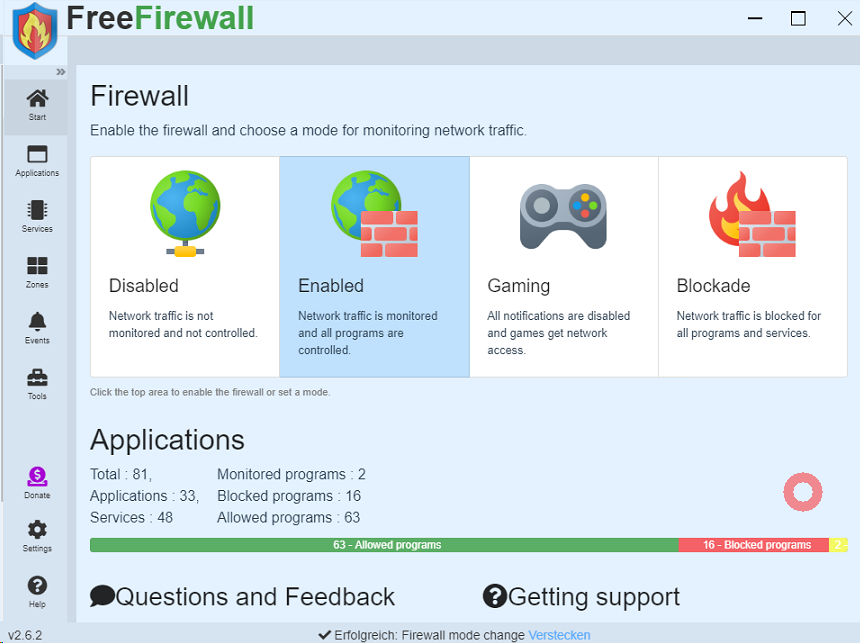
Disabled(無効)
無効状態。
Enabled(有効)
有効状態です。
VNCなどで接続して設定してる場合はEnabledにした瞬間に遮断されるため、Disabledの状態で先にApplicationタブからVNCを探しALL Allowにしとくと良い。
Gaming(ゲーミング)
すべての通知が無効になり、ゲームのみネットワークへアクセスできます。
Blockade(封鎖)
すべてがブロックされます。
Toolsタブ
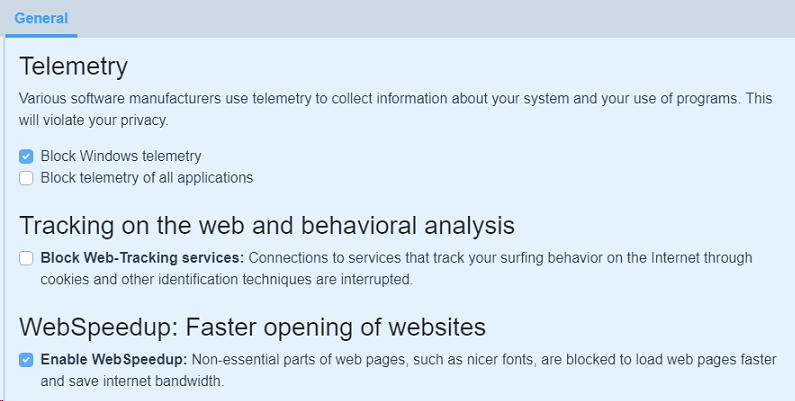
Telemetry
Various software manufacturers use telemetry to collect information about your system and your use of programs. This will violate your privacy.
Block Windows telemetry.
Block telemetry of all applications.
様々なソフトウェアメーカーがテレメトリーを使用して、あなたのシステムやプログラムの使用に関する情報を収集しています。
Windowsのテレメトリーをブロックする。
すべてのアプリケーションの遠隔測定をブロックする。
*「Telemetry」とは、さまざまなソフトウェアメーカーが、あなたのシステムやプログラムの使用に関する情報を収集するために使用する技術です。
Tracking on the web and behavioral analysis.
Block Web-Tracking services: Connections to services that track your surfing behavior on the internet through cookies and other identification techniques are interrupted.
ウェブ上でのトラッキングと行動分析。
ウェブ追跡サービスをブロック Cookieやその他の識別技術により、インターネット上での閲覧行動を追跡するサービスへの接続を遮断します。
WebSpeedup: Faster opening of websites
Enable Web Speedup: Non-essential parts of web pages, such as nicer fonts, are blocked to load web pages faster and save internet bandwidth.
WebSpeedup: ウェブサイトをより速く開く
Webスピードアップを有効にする: ウェブページをより速く読み込み、インターネット帯域幅を節約するために、よりきれいなフォントなど、ウェブページの本質的でない部分がブロックされます。
Settingタブ
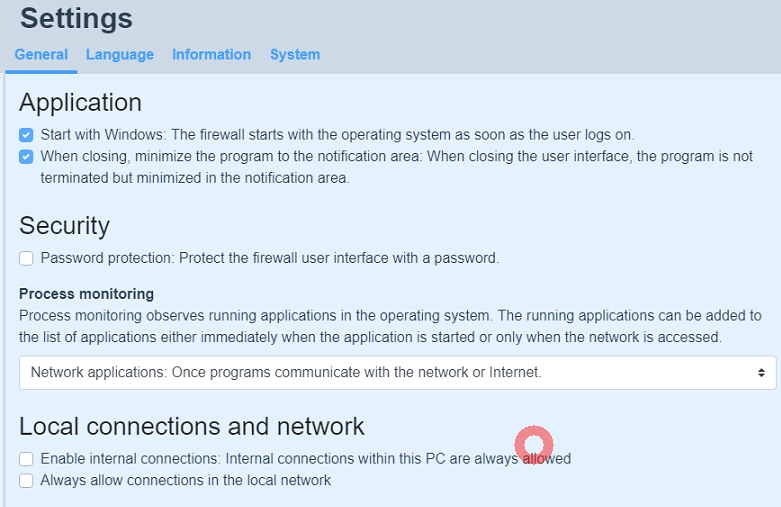
Application
Start with Windows: The firewall starts with the operating system as soon as the user logs on.
When closing, minimize the program to the notification area: When closing the user interface, the program is not terminated but minimized in the notification area.
まずはウィンドウズから: ファイアウォールは、ユーザーがログオンするとすぐにオペレーティングシステムで起動します。
閉じるときは、プログラムを通知領域に最小化します: ユーザー インターフェイスを閉じるとき、プログラムは終了せず、通知領域に最小化されます。
Security
password protection: Protect the firewall user interface with a password.
セキュリティ
パスワード保護: ファイアウォールのユーザーインターフェイスをパスワードで保護します。
Process monitoring
Process monitoring observes running applications in the operating system. The running applications can be added to the list of applications either immediately when the application is started or only when the network is accesed.
Network applications: Once programs communicate with the network or Internet.
All applications: All runing programs are immediately added to the list of applications.
プロセス監視
プロセス・モニタリングは、オペレーティング・システムで実行中のアプリケーションを監視する。実行中のアプリケーションは、アプリケーションの起動時に即座に、またはネットワークにアクセスしたときにのみ、アプリケーションリストに追加することができます。
ネットワークアプリケーション ネットワークまたはインターネットと通信するプログラム。
すべてのアプリケーション: 実行中のすべてのプログラムが直ちにアプリケーションリストに追加されます。
Local connections and network
Enable internal connections: internal connections within this PC are always allowed.
Always allow connections in the local network.
ローカル接続とネットワーク
内部接続を有効にする:このPC内の内部接続は常に許可されます。
ローカルネットワーク内の接続を常に許可します
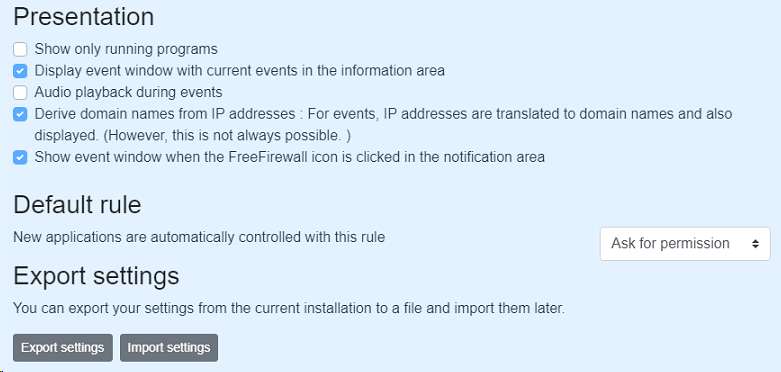
Presentation
Show only running programs
Display event window with current events in the infomation area
Audio playback during events
Derive domain names from IP addresses: For events, IP addresses are translated to domain names and also displayed.(However, this is not always possible.)
Show event window when the FreeFirewall icon is clicked in the notification area.
プレゼンテーション
実行中のプログラムのみを表示
イベントウィンドウを表示し、現在のイベントをインフォメーションエリアに表示する。
イベント中の音声再生
IPアドレスからドメイン名を導き出す イベントの場合、IPアドレスをドメイン名に変換して表示。
通知領域で FreeFirewall アイコンがクリックされると、イベント ウィンドウを表示します。
Default rule
New applications are automatically controlled with this rule
デフォルトルール
新規アプリケーションはこのルールで自動的に制御される


コメント